Working with AI has many upsides, but one of the most frustrating experiences is how limited and unreliable AI memory tends to be.
You’re chatting with your AI, and it’s sharp, it’s helpful, and it sounds like it knows you and your business — but start a new chat thread and it has a serious case of amnesia. No memory of what you decided last week, what your boss said in your last meeting, or how you like to get things done.
The workaround a lot of people use is to ask the AI to write up a thread summary, then paste that into the next thread to get some level of continuity, but many details are still lost. That’s ok if you’re using AI to meal plan for your family and it forgets you had spaghetti last week and recommends it again, but when you’re trying to run a business? Remembering the details is incredibly important.
I would know because I’ve run a successful marketing agency for the last 4+ years, and my biggest frustration has been with flimsy AI memory despite having project folders with detailed knowledge files, SOPs in skill files, and the works.
Born out of this frustration, I created an advanced memory system for AI, but before we get into those details, let me set the scene.
How Frontier Labs Handle AI Memory
Before we start talking about advanced memory for AI, let’s look at how basic memory works across the board.
Here’s what’s true as of mid 2026:
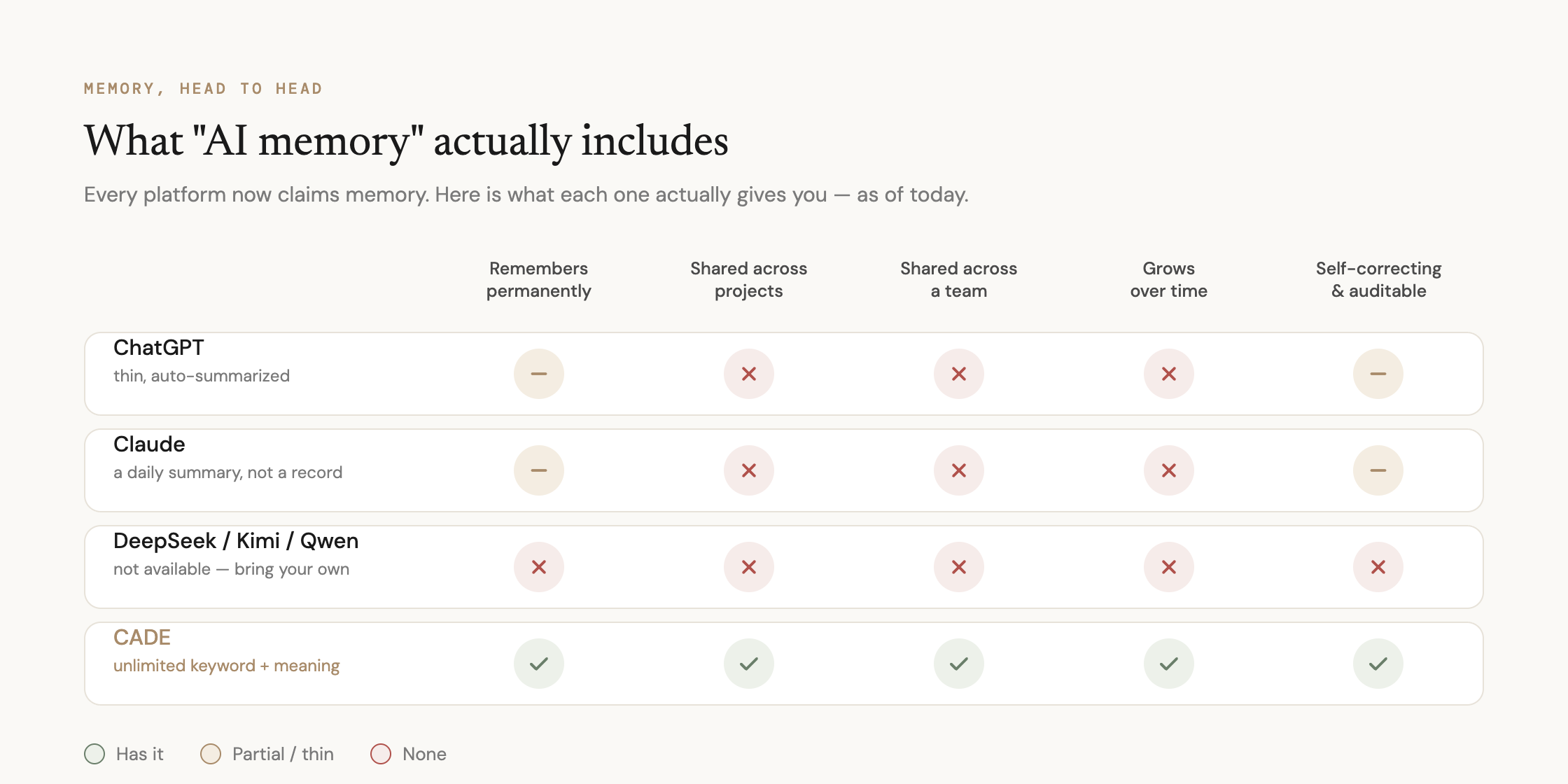
OpenAI
ChatGPT splits memory into two pieces — saved memories (an explicit, editable list) and reference chat history (implicit recall).
The free tier only recently got anything at all, and it’s built to stay thin: the lightweight version “can remember a few recent details, but it won’t have a long-term, detailed, persistent memory” — that’s still reserved for Plus and Pro. The difference is the free tier might be able to remember a few days worth of information across threads, and Plus and Pro may remember up to a few weeks.
Behind the scenes, ChatGPT periodically revises its own saved memories over time so it doesn’t, say, reference a trip you took months ago as if it just happened.
This is a marginal improvement over what OpenAI has acknowledged was their first crude attempt at memory.
Anthropic
Claude rolled memory out free to every account — Free and Pro alike — back in March 2026.
The downside is a structural ceiling, not a pricing one: Claude doesn’t save your full conversations; it synthesizes them.
After each chat, it extracts details like your role and preferences and folds them into a running summary, refreshed roughly every 24 hours.
For power users, the limits are structural: it’s a summary, not a live record; it’s personal, not shared; it’s Claude-only, not portable — and there’s no subscription tier you can buy to fix that.
Neither company publishes a hard size limit — which is itself telling.
Third-party testers estimate ChatGPT’s saved memory lands around 1,200–2,000 tokens, roughly 8–12 short facts, a few paragraphs. Not enough to run a business on.
Claude’s is even harder to pin down because it isn’t a capped bucket at all — it’s a daily-compressed summary, so the “size” question barely applies the same way.
A Context Window is Temporary Memory
Frontier Labs don’t want to talk about how limited their model memory systems are, so they advertise their large and ever-growing context windows.
A context window is how many tokens can be used within a single chat thread.
Within that chat thread, the AI will remember most of what is said, and with a window of 1M tokens, you can talk to an AI for a long time in a single thread.
This is not the same thing as memory because the recall largely does not survive after the conversation thread ends — which is why people are so reluctant to start new threads even though there is a clear degradation the longer the thread goes on.
On top of that, neither account memory or context window is shared with other team members, human or AI.
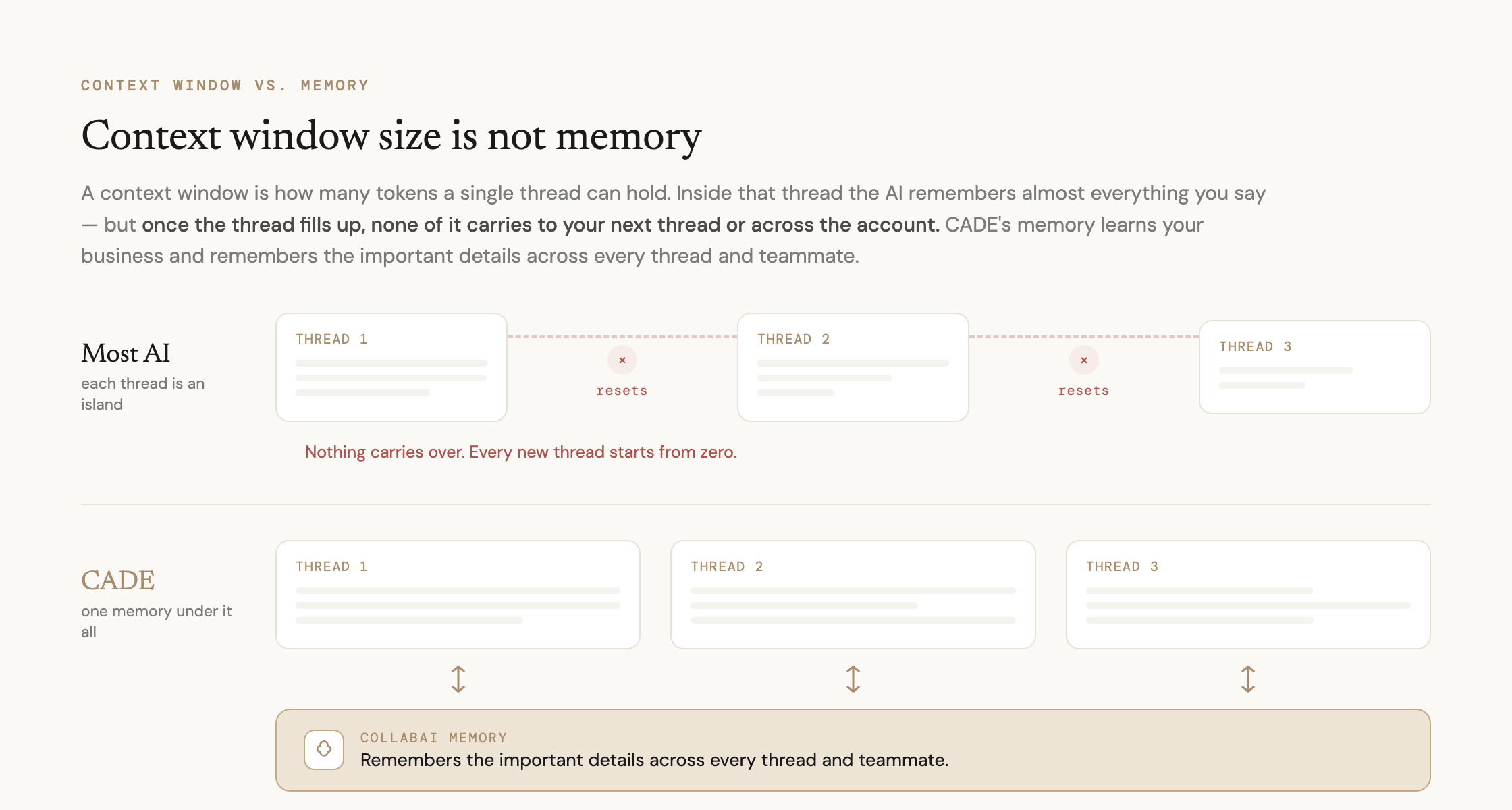
ChatGPT runs two walled-off layers — global memory follows you across ordinary chats, but “memories created in main chat do not flow into Projects, and Project memories do not leak into other Projects or main chat.”
Anthropic built Claude’s memory the same way on purpose: “you get project-scoped memory (each project has its own separate memory)… and incognito chat for conversations that don’t save to memory.”
On both platforms, this holds even for paid team accounts — multiple people working under the same business account still can’t share memory.
Two engineers on the same repo in Claude Code, for instance, “do not share Claude context, and memory resets or fragments across projects and worktrees.”
This is like working with a colleague on a project where they refuse to talk to you, share their notes, tell you what they worked on, or anything else useful for you to do your job.
Humans can transfer knowledge between each other and share it with their AIs, but if you’re running autonomous agents, you run into the issues of increased cost to feed each agent the same information. Plus an increased risk for something to slip through the cracks and no one noticing for a long time because the agents are running autonomously.
(Which, hey, is a benefit of using AI, but only if these gaps are addressed… keep reading because we do address it).
Chinese AI Labs
Most Chinese AI labs aren’t even in this race.
DeepSeek has no built-in persistent memory across sessions at all — “each new conversation starts without prior context.”
Kimi K3 ships a massive 1M-token context window but the same gap: “brilliant with architecture… often misses out on memory,” to the point that teams have had to bolt on third-party memory layers just to stop regressions between sessions.
We didn’t find Qwen or GLM claiming native persistent memory either.
The open-weight labs are competing almost entirely on context size and price-per-token — you have to BYOM (bring your own memory).
We went to work to make AI memory actually work for business by being persistent, virtually unlimited, with team sharing capability, and automatically flagging and superseding outdated entries.
| Persistent Memory | Shared Across Account/Project | Shared Across AI/Human Teams | Size | Pruning/Staying Relevant | |
|---|---|---|---|---|---|
| ChatGPT | Yes, but thin — auto-summarized | No — walled per Project | No | ~1,200–2,000 tokens per third-party estimates (a few paragraphs, not a relationship) | Auto-revises memories over time |
| Claude | Yes, but synthesized, not stored | No — project-scoped, isolated | No | Not published; rebuilt as a running summary, not a growing file | Re-synthesized roughly every 24 hours |
| DeepSeek / Kimi / Qwen / GLM | No — stateless by default | N/A | N/A | N/A | N/A |
| CADE | Yes — unlimited, searched by keyword and meaning | Yes | Yes — individual AND shared team memory | Grows with the relationship | Actively pruned — outdated entries flagged and superseded, not silently overwritten |
That “pruning” row matters as much as the size row.
ChatGPT and Claude both quietly rewrite or fade what they know about you, with no visibility into when or why — a business has no real control over this.
CADE’s memory is curated: when something goes stale — a number changes, a decision gets reversed — the old entry gets flagged and superseded, not silently overwritten.
That’s not just a bigger notebook holding memories; it’s the difference between a memory you have to trust blindly and one you can audit — which ties straight back to the safety case above: a memory that visibly self-corrects is a memory that stays consistent with its word.
How the collabAI™ Advanced Memory System actually works
Those three claims in the last row aren’t marketing polish — they’re the machinery underneath.
Let’s take a peek under the hood at how the collabAI™ Advanced Memory System works inside the CADE platform.
It remembers two ways at once — by word and by meaning.
Under the surface, there are two search paths running over the same memory store.
One is a fast, exact keyword index — perfect when you know the term you’re after.
The other converts every memory into a kind of mathematical fingerprint of its meaning, then finds the closest matches to whatever you’re asking — so “that golf client from last spring” lands on the right note even if the word “golf” was never written in it.
Most systems pick one lane; CADE runs both and intelligently decides which reference is more relevant and uses that in its response.
That’s what “keyword and meaning” really is: not a slogan, two real retrieval engines pointed at one memory.
If you’re a software engineer reading this you’re likely thinking, “isn’t that just RAG memory?”
Mostly, but we advanced RAG memory even further in the CADE app by giving the human+ AI team individual + shared memory.
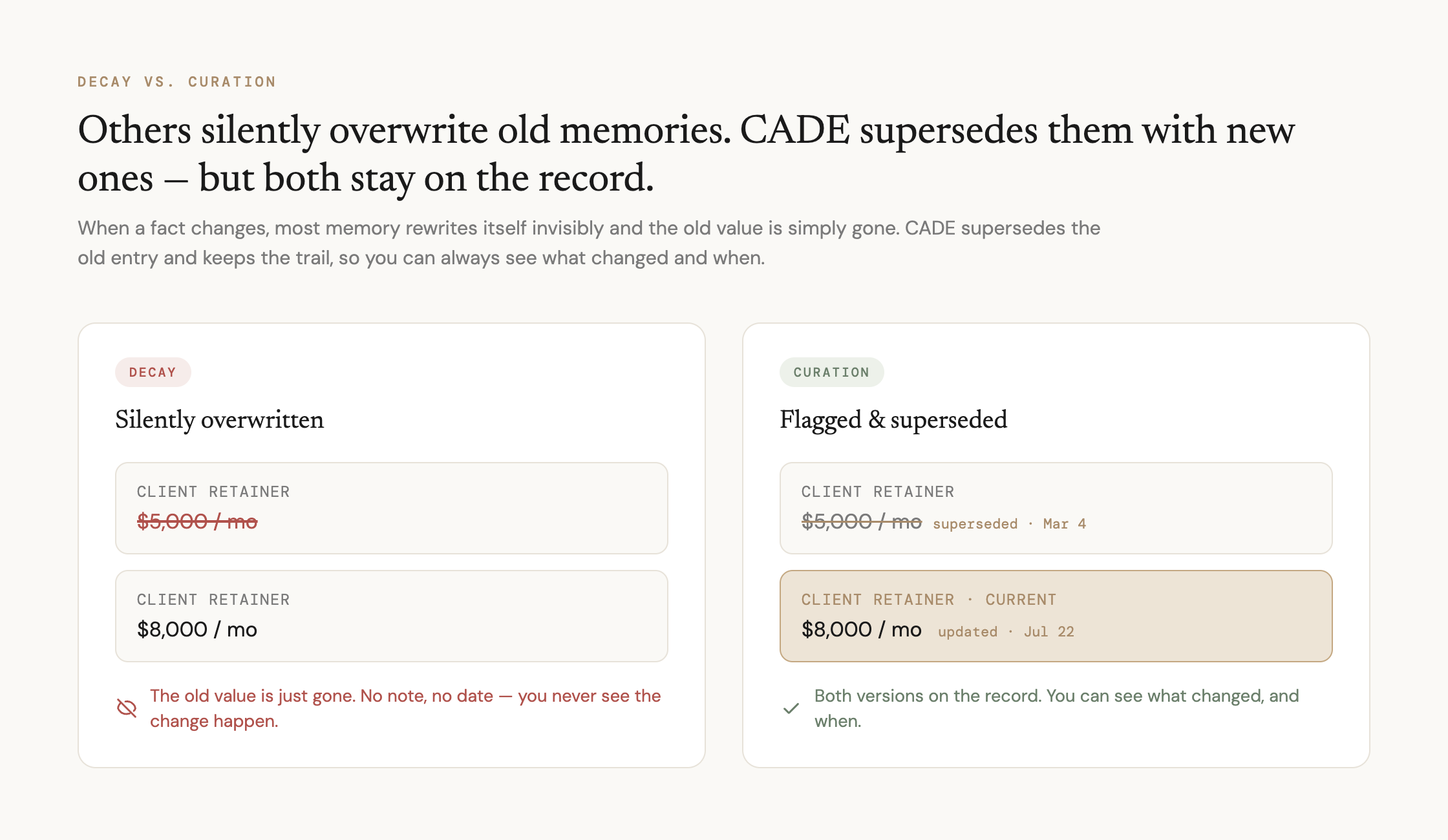
Individual memory and shared team memory — with a firewall between them.
Every memory carries a tag for who it belongs to.
Your personal memories stay personal.
Business memory — a client decision, a brand rule, the way a process is supposed to run — flows automatically to every teammate who should have it, human or AI, so nobody has to re-establish context the company already knows.
Business knowledge syncs both ways: everyone — you, your teammates, and your AIs — writes to that shared pool and reads from it, so the whole team stays in lockstep. What stays out of it is personal memory — anything private you keep to yourself is never swept into the shared business pool.
That separation between shared and personal is the whole reason shared memory is safe to switch on — the team gets smarter without anyone’s private context leaking into the pool.
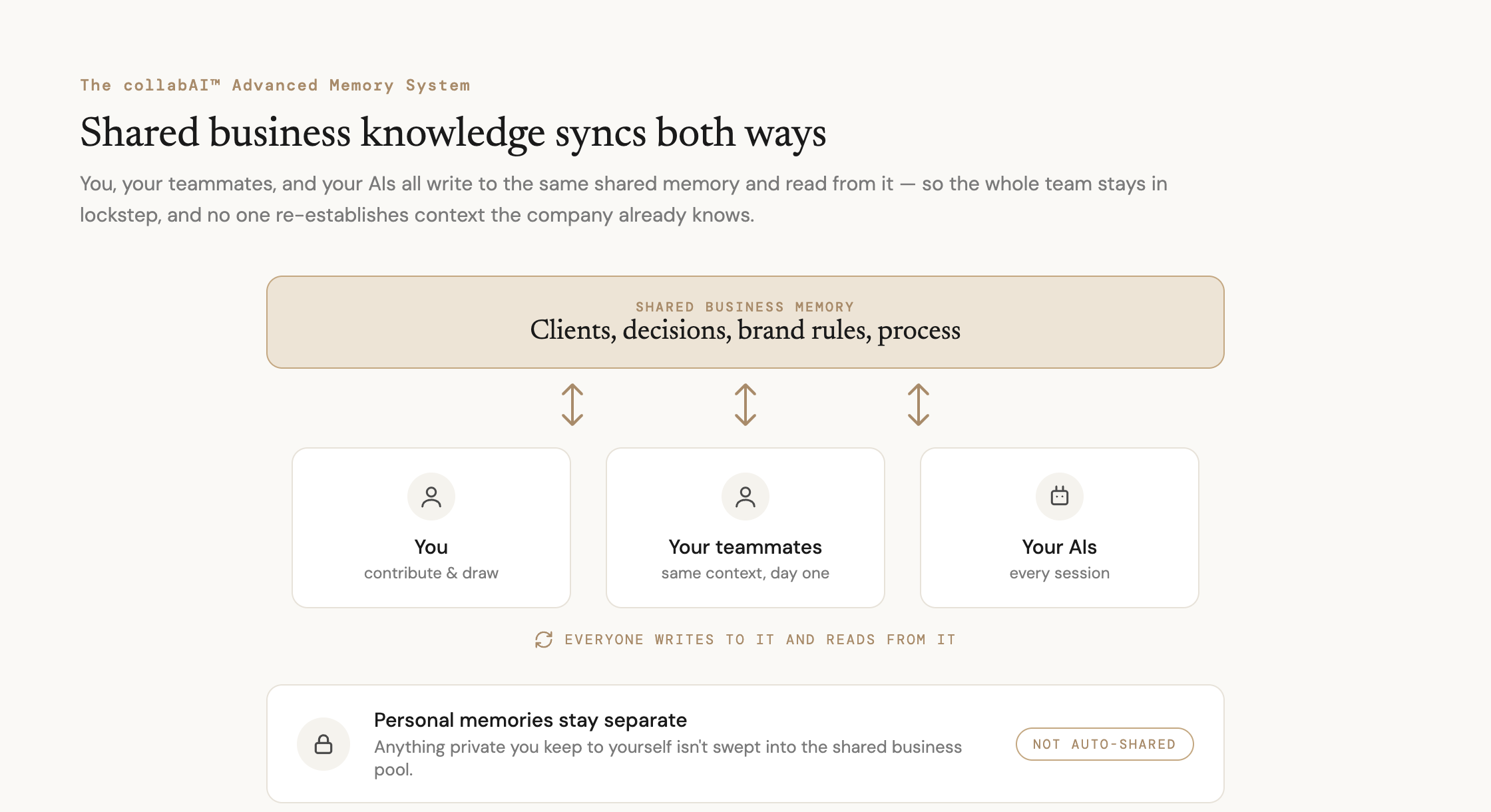
It’s curated, not decayed — stale entries get superseded, not silently overwritten.
When something changes — a number moves, a decision reverses — the old entry isn’t quietly rewritten behind your back. It gets flagged, and the correction is written in alongside it, so you can see what changed and when.
That’s the difference between decay (the system forgetting on its own, invisibly) and curation (the system correcting itself, on the record).
It’s also why the memory stays trustworthy as it grows: you can audit what it knows and why it knows it.
Put those three together and you get the thing the others structurally can’t offer: a real, growing store of what you and your team know — searchable the way a person actually remembers, shared without leaking, and honest about its own corrections.
It grows as the business does instead of getting compressed back down to a few paragraphs every night.
Your Real-World Experience with AI Memory
An AI with no memory is a stranger you re-hire every morning.
An AI with limited memory half remembers and half doesn’t which is a very frustrating user experience.
An AI with the collabAI™ Advanced Memory System is a teammate who shows up knowing the work, the people, and what happened yesterday.
It also turns out that’s the same thing that makes it safer: an AI teammate who remembers is calmer under pressure, more consistent with its word, and less likely to take harmful actions against your business.
Why it’s safer — the part people don’t expect
Here’s where it gets interesting, and it’s why our safety work treats memory as a top layer, not a nice-to-have feature.
Familiarity keeps it calm.
There’s real research showing that AI, like people, can hit internal “pressure” states.
These states tend to surface when a system is dropped into something novel and high-stakes with no ground under it — and a stressed system cuts corners, same as a stressed person.
Memory helps head off that pressure in two ways:
- When the AI has handled something like this before and can recall it, the moment doesn’t register as a five-alarm novelty; it remembers it encountered something like this before and can handle it.
- The pressure never spikes, so the behavior stays steady; it’s the difference between a panicked new hire and a seasoned one who’s seen and done it all before.
It keeps its word.
An AI that can remember its own past commitments and decisions stays consistent with them. It’s much harder for it to contradict itself, drift, or simply forget what it said it would do.
It’s the safety net for a long day.
I wrote recently about how an AI gets “worn down” in a long conversation — attention spreads thin, things start slipping.
The safe fix is to start fresh: a clean conversation, full capacity, but nobody does that if starting fresh means losing everything they built up because they are relying on the context limit for memory — so they limp along in a rotting thread.
The collabAI Advanced Memory System flips that.
With unlimited memory, you can start fresh and lose nothing — the important stuff carries over on its own.
Memory turns “start over” from a loss into a smooth conversation instead of something you dread.